MEKI Analytics: X-ray inspection records in one view
- All connected MEKI AI systems on one dashboard
- Batch results and X-ray images of recorded rejects
- CCP Monitoring of routine test-card checks, with PDF export
- Runs on your factory network, no cloud needed
What is MEKI Analytics?
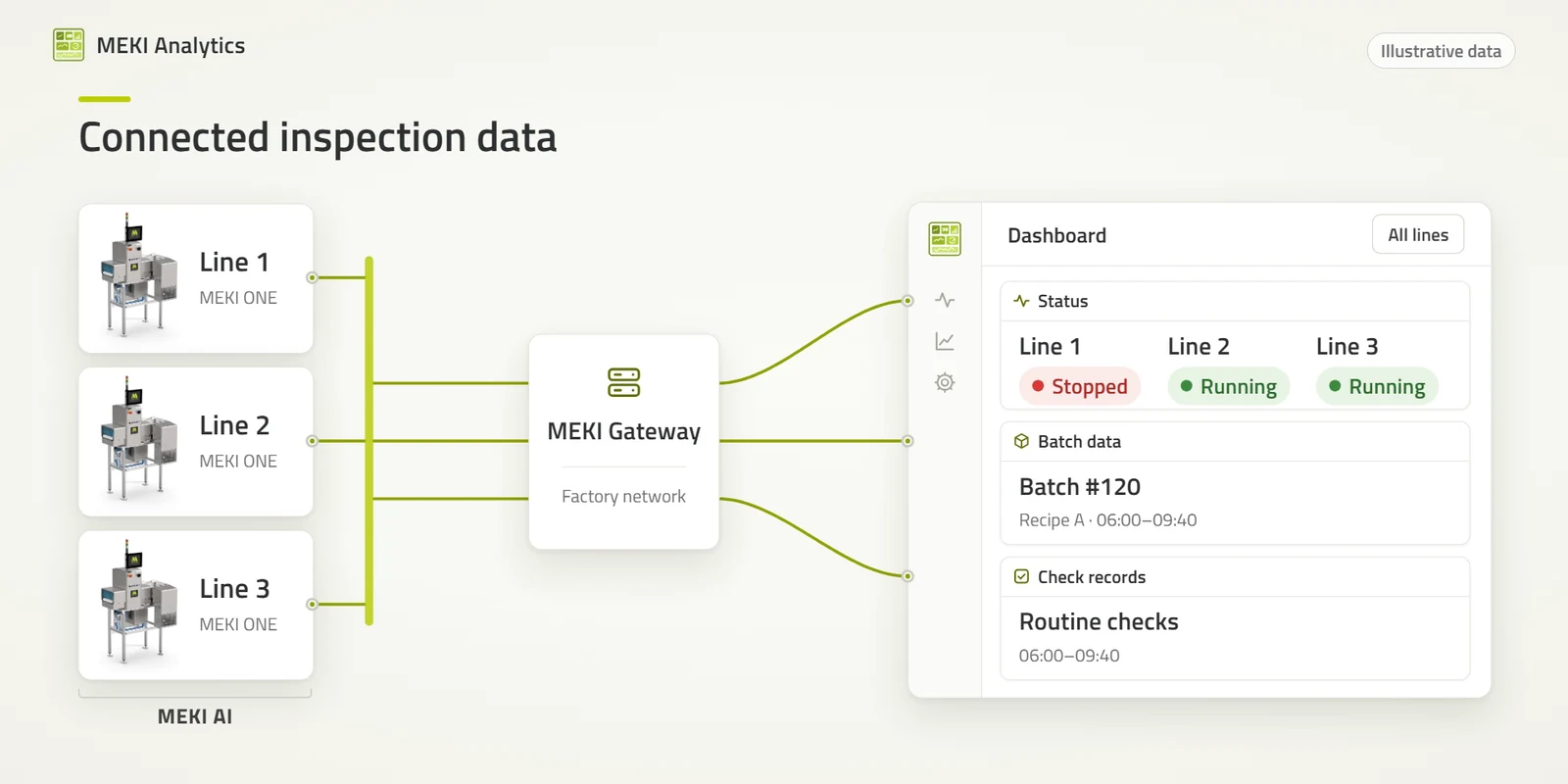
MEKI Analytics is Mekitec's inspection data software for Mekitec X-ray systems running MEKI AI. It reads line status, batch results, recorded rejects with their X-ray images and routine test-card checks through MEKI Gateway on the factory network, so QA teams can review a defined line, product and time window and prepare reports. MEKI Analytics was formerly called MEKI Data Manager and is included with a MEKI AI subscription.
Your MEKI AI systems already record what they inspect, what they reject and which routine checks were done. The hard part is finding the right record when an auditor, a customer or your own team asks about one batch.
MEKI Analytics brings those records together from all connected systems. QA sees which line needs attention, opens the batch, looks at the X-ray image of a rejected product and reviews the test-card checks, without going from one system's screen to the next.
Request access to the live demo
How QA uses MEKI Analytics
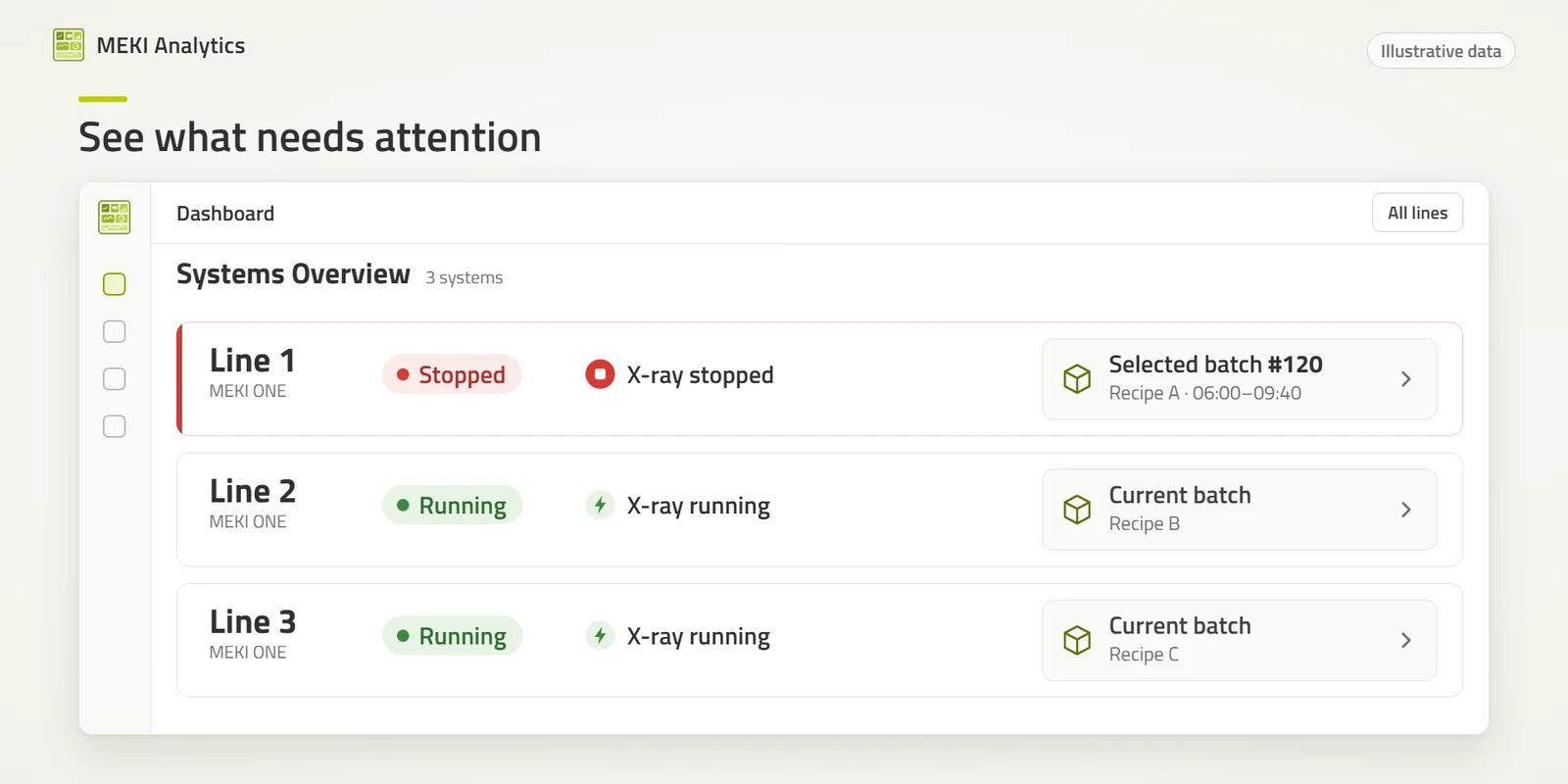
1. See which line needs attention
All connected systems on one dashboard: running or stopped, X-ray status, and alerts such as an open door or a safety fault.
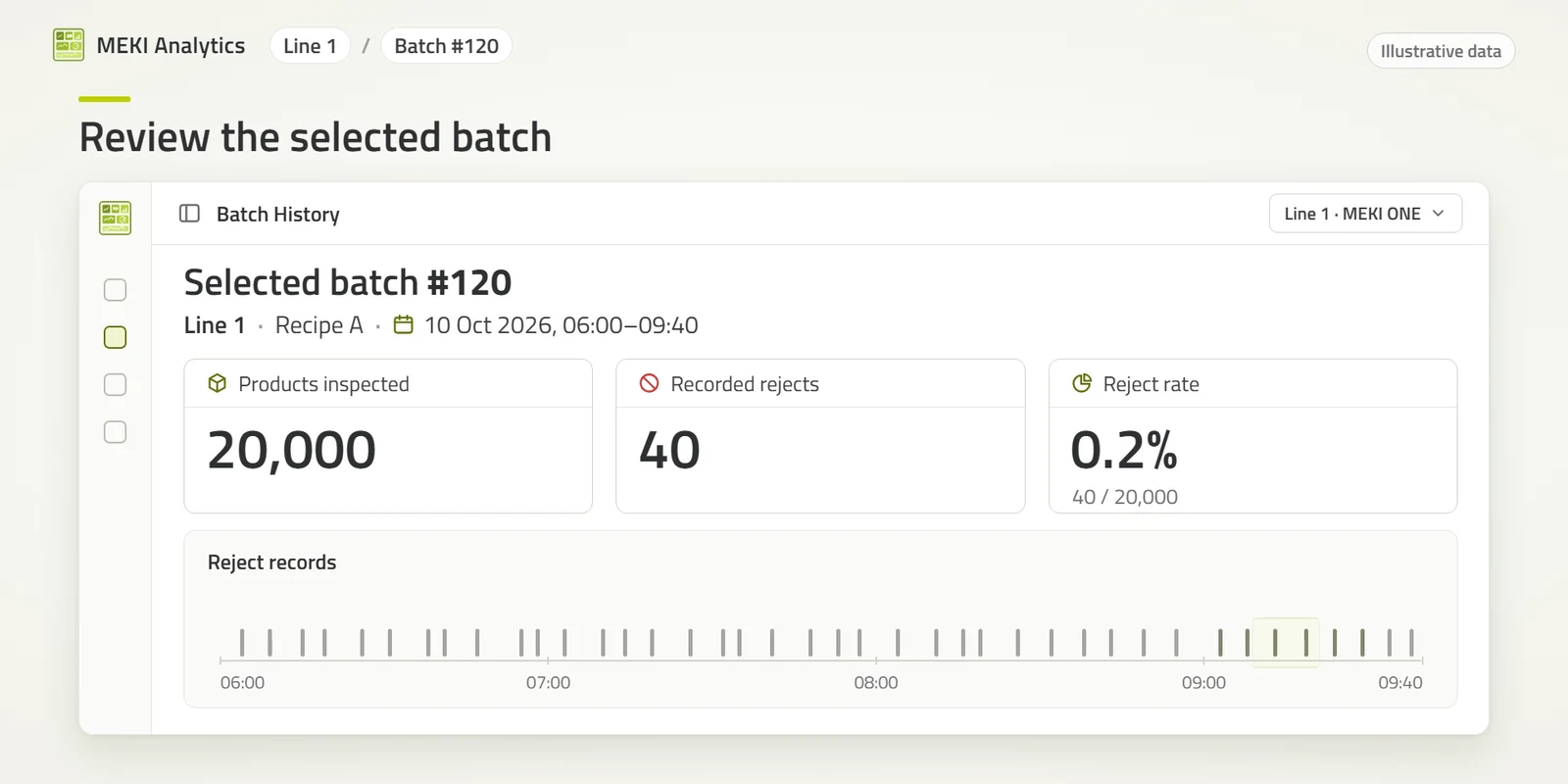
2. Review the batch
Each batch shows the product, start and end time, products inspected, recorded rejects and the reject rate, with the rejects on a timeline. Filter by line, product and time window.
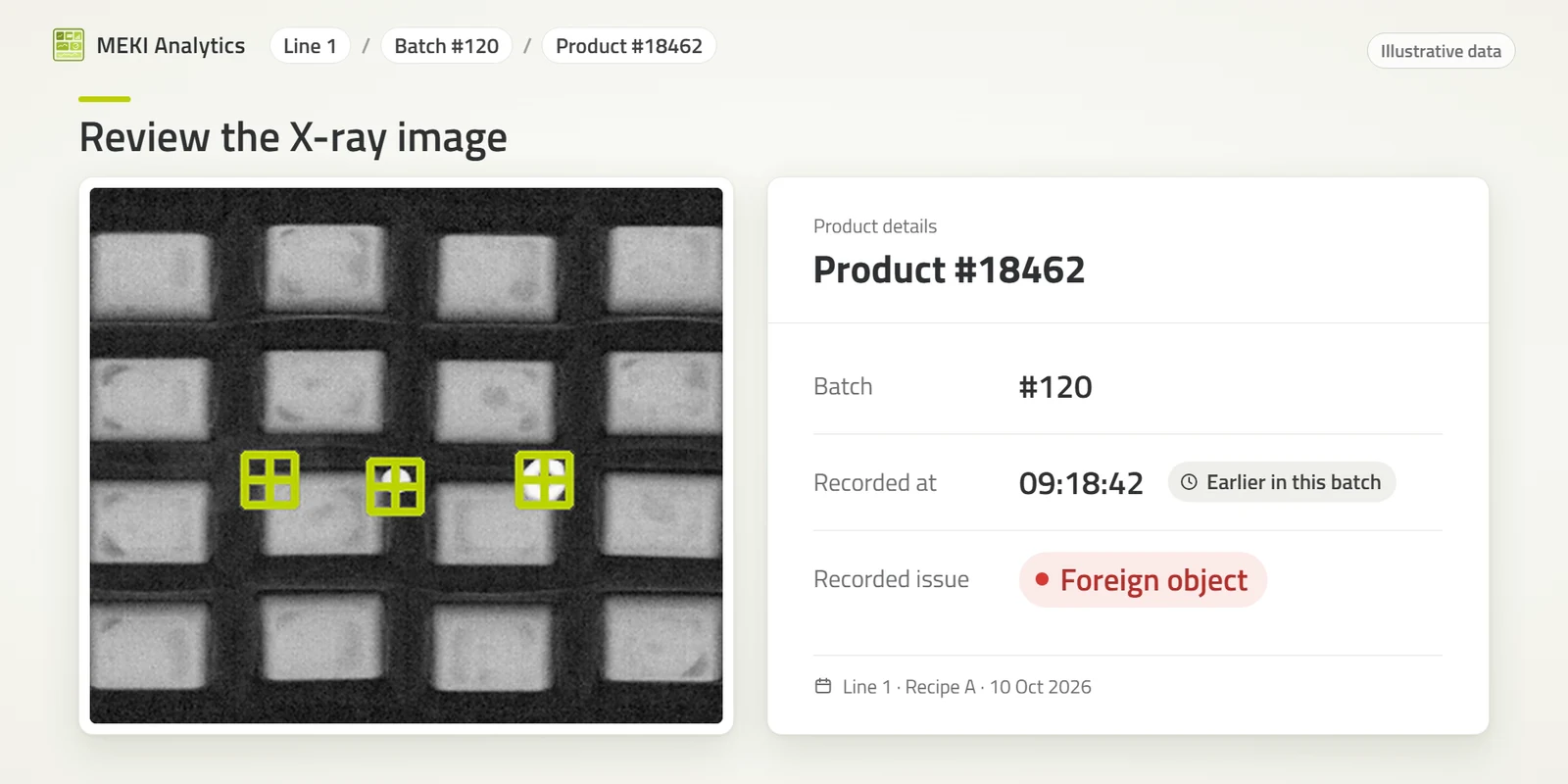
3. Look at the X-ray image
Open a recorded reject to see its X-ray image with the detections marked, when it was recorded and which check rejected it.
4. Review routine checks and export them
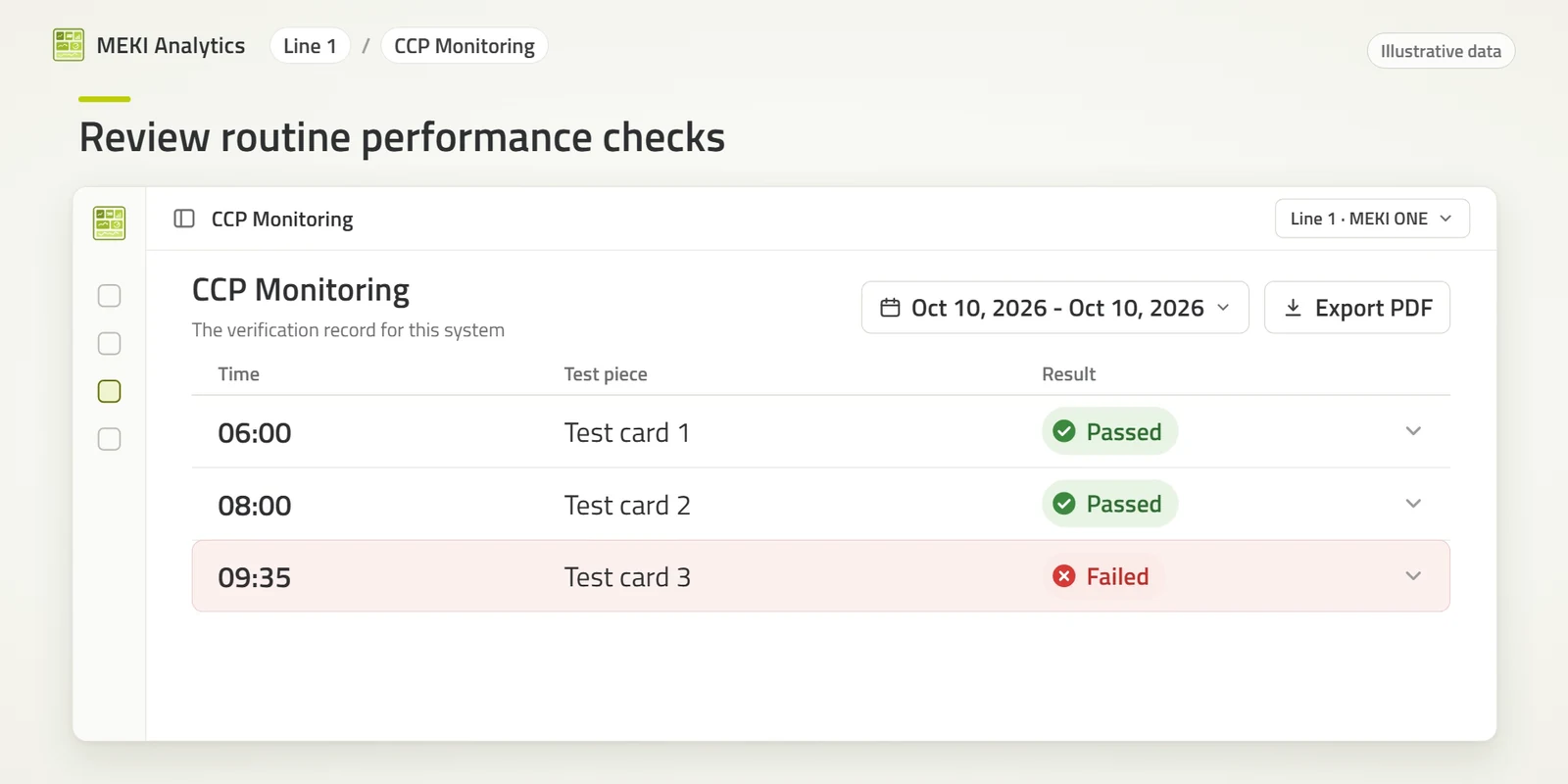
CCP Monitoring lists the routine test-card checks recorded on each system: when each check was done, with which test piece and whether it passed or failed. A check without a recorded result is shown as unrecorded, not as passed. Export the records as a PDF for your files or for an audit.
MEKI Analytics in your Critical Control Point
A Critical Control Point for foreign bodies has to answer five questions. MEKI Analytics answers the last one.
Inspect
Was the product inspected? The MEKI X-ray system with MEKI AI inspects the product on the line.
Remove
Was suspect product removed? The reject system is configured for the line. On MEKI ONE it is integrated into the frame.
Prove
Was removal confirmed? Reject confirmation checks that the rejected product left the line.
Check
Were the routine checks done? MEKI AI Validation Mode reminds operators when a test-card check is due and records the result on the system.
Record: MEKI Analytics
Can the records be retrieved for a defined line, product and time window? MEKI Analytics brings them together: batch results, X-ray images of recorded rejects, CCP Monitoring of the routine checks and a PDF export.
Equipment and software support the CCP. Validating it for each product remains part of your site's procedures.
Read more: What a complete X-ray CCP must answer and How to retrieve X-ray CCP records.
Spot trends before they become problems
Beyond single records, MEKI Analytics shows how inspection results develop over time:
- Quality trends for each product and line
- Defect analysis: which reject reasons occur most often, and when
- SPC control charts of the reject rate per batch, with warning and control limits
- Uptime: running time, stops and configuration changes
When a product starts rejecting more than usual, you see it in the trend and can check the X-ray images behind the numbers before you change anything on the line.
Built for the factory network
Each MEKI AI system shares its records through MEKI Gateway on the factory network. No cloud service and no internet connection are needed.
MEKI Analytics only reads the records. The inspection and its settings stay in MEKI AI.
Built into each system for that system's own records, or as a Windows desktop app that brings several systems together and exports PDF reports.
Frequently asked questions
Is MEKI Analytics the same as MEKI Data Manager?
Yes. MEKI Analytics is the new name of MEKI Data Manager.
What does MEKI Analytics cost?
It is included with a MEKI AI subscription.
Which systems does it work with?
Mekitec X-ray systems that run MEKI AI and are connected through MEKI Gateway. We confirm which MEKI AI and Gateway versions your site needs. Systems in the current range can be upgraded to MEKI AI.
Does it need internet or a cloud service?
No, MEKI Analytics runs on your factory network.
Is the PDF export a validation report?
It is a record of the routine checks: which were done, when, with which test piece and with what result. Validating the inspection for each product remains part of your site's procedures.
How can we try it?
Request access to the live demo with example data, or contact us to check what your systems need.
See MEKI Analytics with example data
The live demo runs MEKI Analytics on example production lines. Request access and our sales team will email you a personal link.
Request access to the live demo
Key Features
All lines in one view
Status, alerts and inspection records from every connected MEKI AI system on one dashboard
X-ray images of rejects
Open a recorded reject to see its X-ray image, batch, time and the check that rejected it
Routine checks on record
CCP Monitoring shows passed, failed and unrecorded test-card checks, with PDF export
Stays on your network
Runs on the factory network through MEKI Gateway, with no cloud service or internet connection needed